Nối Search Console và GA4 vào Keycrawler
Bốn bước, khoảng một phút. Bạn không cần tạo project trên Google
Cloud, không cần khoá API, không phải gõ tay chuỗi sc-domain: hay dãy số property.
Cần có: một tài khoản Google đang đọc được property Search Console và property GA4 của website bạn muốn phân tích. Nếu bạn xem được số liệu trong hai công cụ đó bằng tài khoản nào, thì dùng đúng tài khoản ấy.
Trong Keycrawler, bấm Cấu hình rồi cuộn xuống khối Cấu hình Google APIs.
⚠️ Bỏ qua khối "Nâng cao — dùng OAuth client riêng". Nó dành cho tổ chức bắt buộc grant phải nằm trong project Cloud của họ. Bạn không cần mở nó.
Nếu chỗ đó hiện dòng chữ đỏ "Chưa có OAuth client — dán Client ID và Secret": bản Keycrawler bạn đang dùng được dựng trước khi KeyTools phát hành OAuth client dùng chung, nên nó vẫn đòi mỗi người tự tạo project Google Cloud. Viết cho support@keytools.top — chúng tôi gửi bản mới, và bốn bước dưới đây áp dụng được ngay.
Trình duyệt mặc định của bạn mở ra một trang của Google. Chọn tài khoản đọc được hai property nói trên.
⚠️ Đây là trang của Google, không phải của Keycrawler. Keycrawler không bao giờ nhìn thấy mật khẩu Google của bạn.
Bạn sẽ gặp màn hình này, và nó không có nghĩa là có gì sai.
Google chưa xác minh ứng dụng này
→ bấm Advanced / Nâng cao
→ bấm Go to KeyTools (unsafe) / Chuyển đến KeyTools (không an toàn)
Vì sao nó hiện ra, nói thẳng: Keycrawler xin quyền đọc Search Console và Analytics. Google xếp hai quyền đó là nhạy cảm và bắt ứng dụng phải qua một vòng xét duyệt trước khi màn hình cảnh báo biến mất. Chúng tôi đã nộp hồ sơ; trong lúc chờ, cảnh báo vẫn hiện. Chữ "không an toàn" là câu Google dùng cho mọi ứng dụng chưa duyệt xong, không phải một phán xét về Keycrawler.
Quyền chúng tôi xin là quyền CHỈ ĐỌC. Keycrawler không sửa, không xoá, không đăng gì vào Search Console hay Analytics của bạn — nó không có quyền để làm thế.
Sau đó bấm Cho phép. Trang báo kết nối thành công, bạn đóng thẻ và quay lại Keycrawler.
Ngay sau khi kết nối, Keycrawler tự liệt kê đúng những property mà tài khoản của bạn đọc được. Tick cái bạn muốn, bấm Áp dụng. Xong.
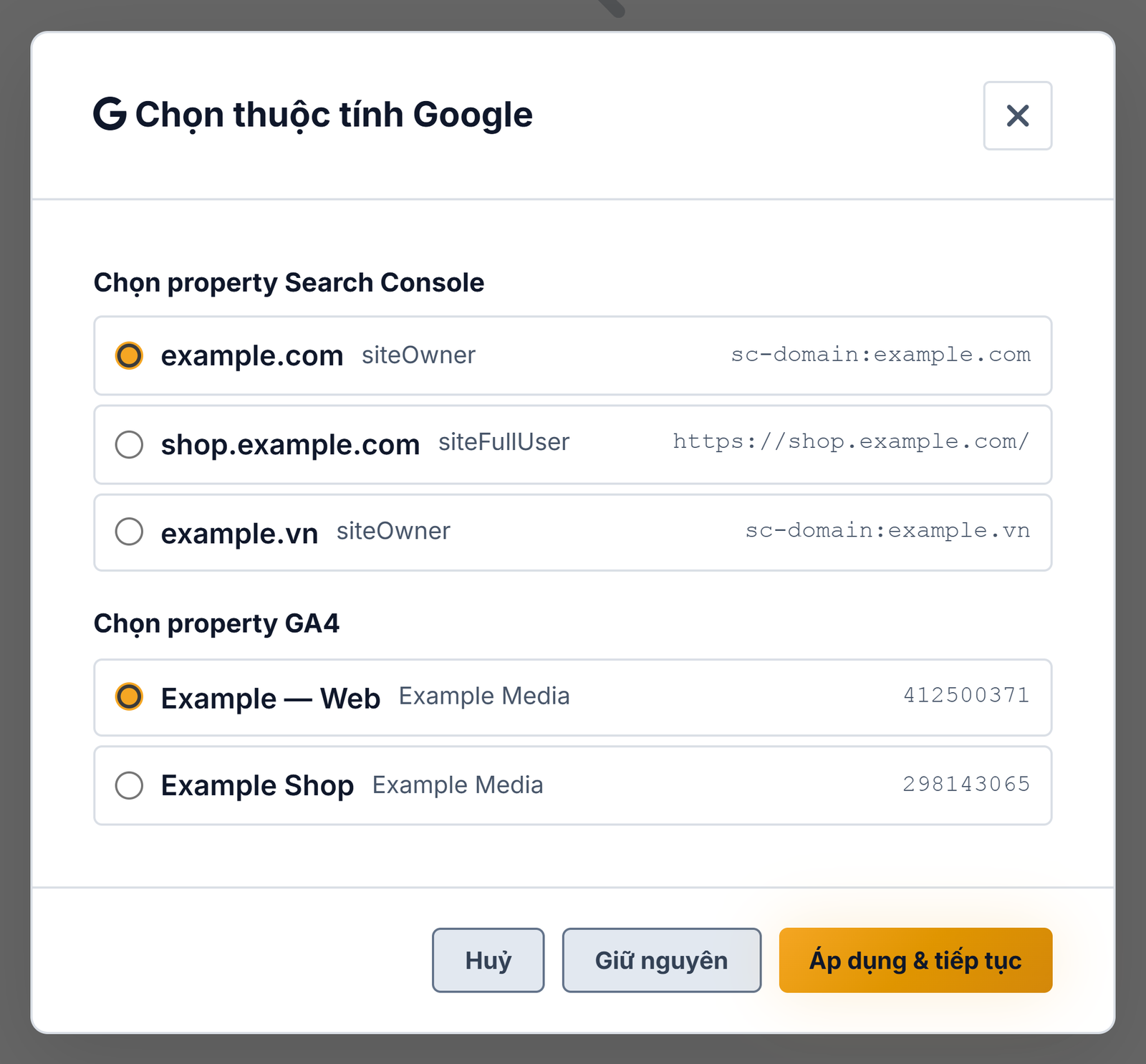
Từ giờ, mỗi lần bấm Làm giàu dữ liệu sau khi crawl, số liệu Search Console và GA4 sẽ được ghép vào từng URL.
Khi có gì đó không đúng
Danh sách property hiện ra trống
Gần như luôn là sai tài khoản Google. Bấm Ngắt kết nối rồi nối lại, lần này chọn tài khoản mà bạn vẫn dùng để mở Search Console.
Trường hợp còn lại: tài khoản đúng nhưng chưa được cấp quyền trên property. Chủ website phải thêm bạn làm người dùng trong Search Console và trong GA4 — đó là việc phải làm bên phía Google, Keycrawler không làm thay được.
Property hiện trong danh sách nhưng làm giàu dữ liệu báo lỗi quyền
Search Console có trả về cả những property mà tài khoản của bạn chưa được xác minh. Keycrawler đã loại chúng khỏi phần gợi ý tự sửa, nhưng nếu bạn tự chọn một cái như vậy thì mọi truy vấn sẽ bị từ chối. Vào Search Console xác minh quyền sở hữu, rồi thử lại.
Trước đây tôi gõ tay "sc-domain:..." và bị lỗi
Search Console có hai loại property cùng trỏ về một website và
không thay thế được cho nhau: sc-domain:vidu.com và
https://vidu.com/. Dùng chuỗi của loại này khi tài khoản sở hữu loại kia là lỗi
quyền — và hai chuỗi đó đọc lên thì đều "trông đúng".
Đó chính là lý do bộ chọn tồn tại. Nếu bạn đã gõ nhầm loại, Keycrawler nhận ra và đề nghị đúng một phương án thay thế, kèm cả chuỗi cũ lẫn chuỗi mới để bạn thấy nó đổi gì.
Dữ liệu của tôi đi đâu?
Ở lại trên máy bạn. Keycrawler gọi API của Google từ chính máy bạn và ghi kết quả vào cơ sở dữ liệu crawl trong thư mục người dùng của bạn. Chúng tôi không có máy chủ nhận dữ liệu đó. Chính sách bảo mật nêu từng tệp phần mềm ghi ra và từng địa chỉ nó gọi tới.
Vẫn tắc?
support@keytools.top · +84 39 448 2728. Nói giúp bạn kẹt ở bước mấy — bốn bước ở trên có đánh số để dùng cho việc đó.
Connect Search Console and GA4 to Keycrawler
Four steps, about a minute. You do not need a Google Cloud
project, an API key, or to type sc-domain: strings and numeric property ids.
You need: a Google account that can already read the Search Console property and the GA4 property for the site you want to analyse. Whichever account you use to look at those two tools is the one to use here.
In Keycrawler, press Settings and scroll to the Google APIs block.
⚠️ Ignore the "Advanced — use your own OAuth client" block. It exists for organisations that require the grant to sit inside their own Cloud project. You do not need it.
If that block shows a red line reading "Chưa có OAuth client": your copy of Keycrawler was built before KeyTools shipped a shared OAuth client, so it still asks every user to create their own Google Cloud project. Write to support@keytools.top — we will send you a current build, and the four steps below then apply as written.
Your default browser opens a page belonging to Google. Choose the account that can read the two properties.
⚠️ That page is Google's, not Keycrawler's. Keycrawler never sees your Google password.
You will meet this screen, and it does not mean anything is wrong.
→ click Advanced
→ click Go to KeyTools (unsafe)
Why it appears, plainly: Keycrawler asks for read access to Search Console and Analytics. Google classifies those two as sensitive and requires an app to pass a review before the warning goes away. We have submitted; until the review completes, the warning stays. The word "unsafe" is what Google shows for every app that has not finished review — it is not a judgement about Keycrawler.
The access we ask for is READ-ONLY. Keycrawler cannot change, delete or publish anything in your Search Console or Analytics — it does not hold the permission to.
Then press Allow. The page confirms the connection; close the tab and return to Keycrawler.
The moment you are connected, Keycrawler lists exactly the properties your account can read. Tick the ones you want and press Apply. Done.
From then on, pressing Enrich after a crawl joins Search Console and GA4 figures onto each URL.
When something is wrong
The property list comes up empty
Almost always the wrong Google account. Press Disconnect, connect again, and this time choose the account you actually use to open Search Console.
The other case: right account, but no permission on the property. The site owner has to add you as a user in Search Console and in GA4 — that is work on Google's side, and Keycrawler cannot do it for you.
The property is listed but enrichment reports a permission error
Search Console also returns properties your account has not verified. Keycrawler keeps those out of its one-click correction, but if you pick one yourself every query is refused. Verify ownership in Search Console and try again.
I used to type "sc-domain:..." and it failed
Search Console holds two kinds of property that name the same website and
are not interchangeable: sc-domain:example.com and
https://example.com/. Using the string for one when the account owns the other is a
permission error — and both strings look correct when you read them.
That is exactly why the picker exists. If you did type the wrong kind, Keycrawler recognises it and offers the one exact correction, showing both the old string and the new one so you can see what changed.
Where does my data go?
It stays on your machine. Keycrawler calls Google's API from your own computer and writes the result into the crawl database in your user folder. We have no server that receives it. The Privacy Policy names every file the software writes and every address it calls.
Still stuck?
support@keytools.top · +84 39 448 2728. Tell us which step you are stuck on — the four steps above are numbered for exactly that.
© 2026 KeyTools · Vũ Văn Linh · Thành phố Hồ Chí Minh, Việt Nam · support@keytools.top